
Resident portal
Apply, pay and renew without a phone call.
Residents, businesses, consultants and agencies each get an account scoped to what they are allowed to see. No anonymous access by design — every action is tied to a person.
- Sign-in options — email and password, Google, Microsoft, or your identity provider (OIDC); one-time-code MFA.
- Guided forms — mandatory fields, drop-downs, format rules, conditional questions, document checklists with accepted formats.
- Save and resume — drafts kept until the applicant is ready; eligibility checked against your GIS address data at intake.
- Status in plain language — dated history, return-for-information loop, withdraw before approval, invoices always available.
- Renewals and waitlists — pre-filled renewals, reminders at 30 and 7 days, waitlist position shown, optional auto-renewal.
- Accessible and multilingual — WCAG 2.1 AA, accessibility widget, English, French and Spanish, works on any phone.
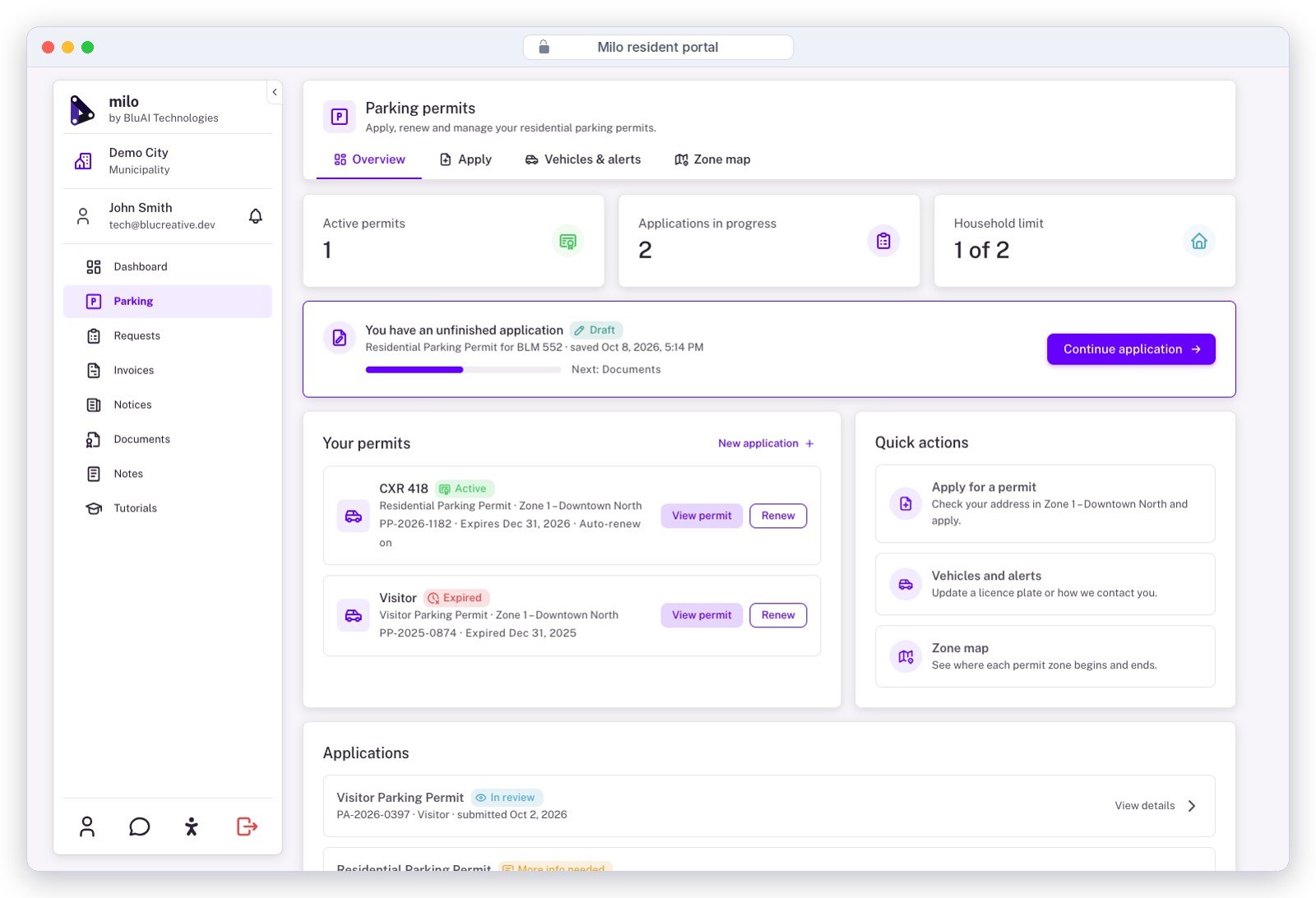
Resident dashboard — active permits, an unfinished application to resume, and quick actions. Demo City sample data.
Workflow builder
Compose a permit from stages, not from code.
Super admins compose each permit arc visually from four stage types. Workflows are validated before publishing and can be walked end-to-end in a sandbox with no live emails, texts or payments.
Applicant input
Forms, documents and declarations required from the requester, with per-stage document checklists.
Staff review
Assigned to a role, user or department; circulation to external agencies with responded/outstanding tracking.
Decision
Approve, approve with conditions, refuse or return — with structured outcomes and clearance of conditions per party.
Payment
Anywhere in the arc: application fee up front, permit fee on approval, deposits, ad hoc charges.
- Unlimited stages and workflows; duplicate a workflow to start the next permit
- Conditional routing from intake answers; branches and resubmissions as linked files
- Role permissions enforced on every transition; separation of duties
- Stage timers with threshold alerts and follow-up dates (set up at onboarding)
- "Accepting applications" switch with availability dates per program
- Separate test environment with TEST ribbon and resettable sample data
Staff workspace
One queue across every program.
Clerks, planners, finance and enforcement work the same files from a single review queue, each seeing only what their role allows.
- Find anything — live search as you type; filter by applicant, type, stage, address, dates, file number; saved filters.
- Bulk actions — notify, approve, reject, assign or reassign many files at once.
- One-screen review — applicant, property, documents, payments, eligibility results and map on a single page.
- Comments on the file — identified, timestamped, with statuses; admins can edit, reassign or compile them into a letter.
- Third-party seats — animal control, conservation authorities, utilities and consultants get scoped accounts, tasks and deadlines.
- Staff SSO — Microsoft Entra ID or Google Workspace; groups mapped to Milo roles; optional IP allowlist.
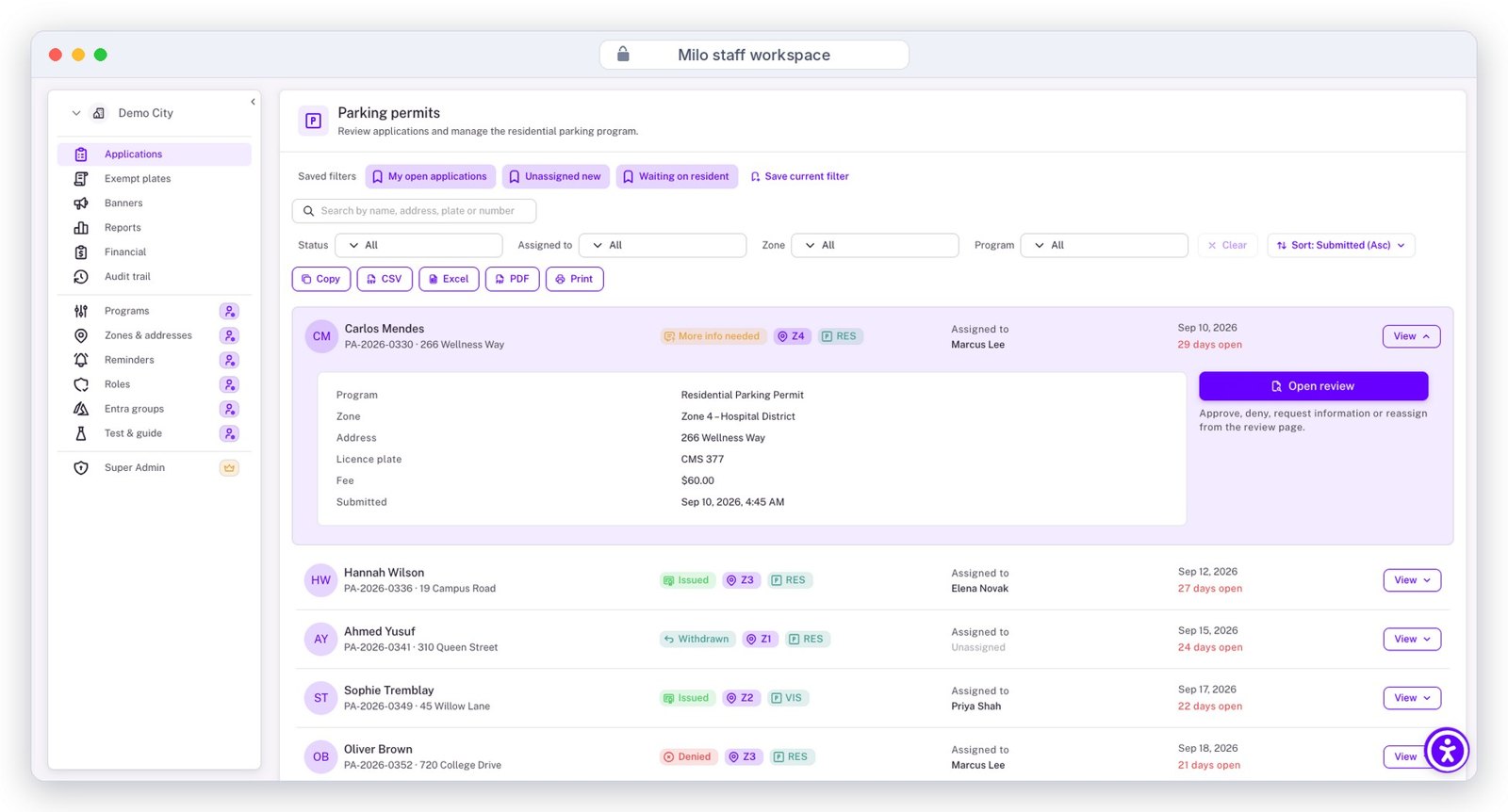
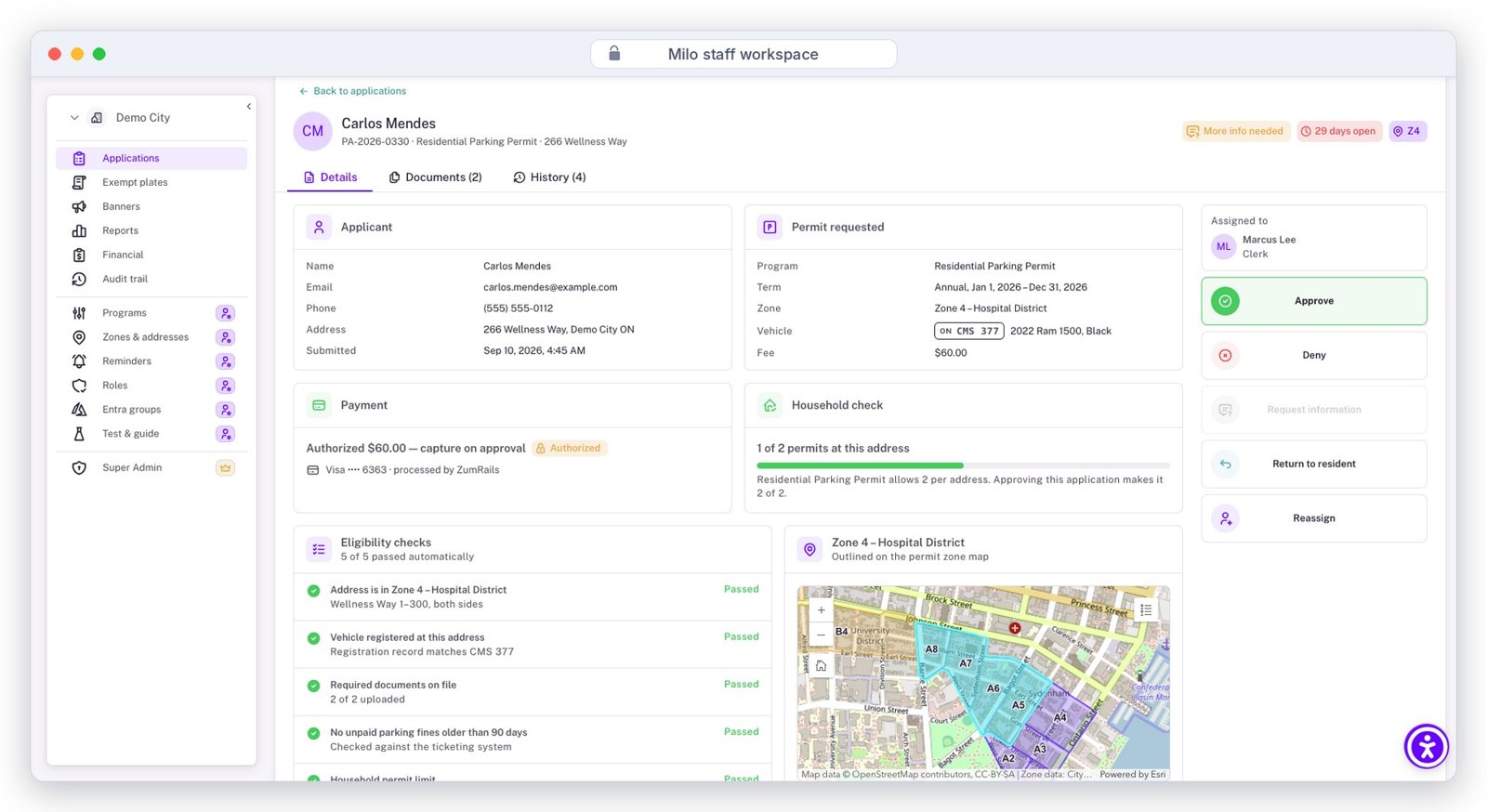
The review queue with saved filters and bulk export, and the one-screen review with every check and action in one place.
Documents and correspondence
Every version kept. Every letter from a template.
Uploads are stamped with uploader and date and versioned additively — earlier versions are never lost. Documents show per stage while a file is active and as one dossier once it is complete.
Storage, your way
Built-in document management by default; extend to S3-compatible storage for high volumes, or store and mirror in Google Drive.
Three ways to write a letter
Automated notices on workflow triggers; your templates with editable sections; or OfferioAI drafting a compiled comment letter for staff review.
Output formats
PDF, editable Word or Google Docs; permits as PDF with QR code; full-file export of records, documents and audit trail in one action.
Payments and finance
Payment is a stage, not a separate system.
Residents pay inside Milo through QuickBlu, Blü's own payment service — never redirected to a third-party page. Invoices attach to both the file and the payer's account.
- Fee schedule your staff maintain — conditional and variable fees (per lot, per unit), proration, permit and renewal and replacement fees.
- Pay-on-approval or authorize-then-capture — choose per program.
- Counter payments — terminal, cheque or cash recorded against the same invoice with the terminal reference.
- Refunds and waivers — full or partial to the original method; waivers by code or authorization with the approver recorded.
- Reconciliation — financial dashboard reconciles to processor settlements; arrears exportable to the tax roll.
QuickBlu
Blü's in-app payment service — credit card, Interac and EFT in Canada; credit card in the US
Worldline
Card processing on your own merchant account (Canada)
Moneris
Moneris Checkout with 3-D Secure and Vault tokens (Canada)
Stripe
Card processing on your own account (Canada and US)
PCI out of scope
Tokens, brand and last four digits only — never card data
Notices and communication
Reach residents the way they asked to be reached.
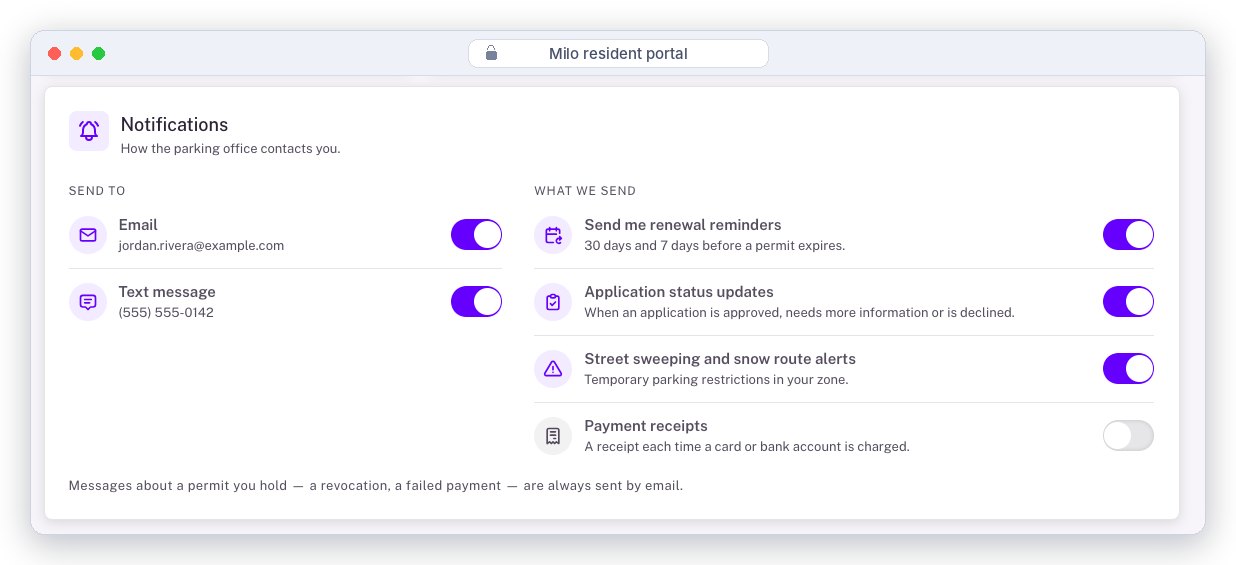
Standard notices follow each registered user's preferences — email, SMS or both. Emergency notices override those preferences and go to everyone, by every channel, at once.
Workflow messages
Configurable text at every transition: received, paid, approved, expiring, revoked.
Reminder rules
Per-rule timing, channel and template — 30 and 7 days before expiry, follow-up dates with alerts.
Banners and community notices
Severity, audience and schedule; also sent by email or SMS — park closures, vaccine season, lost pets.
Letter mail
Blü prints and mails invoices and renewal notices (up to three sheets) for residents who are not online. Mail-out service →
Reporting and audit
Numbers council can trust, exports Finance can use.
Operational and financial dashboards out of the box; every list and report exports to Excel, CSV, PDF or TXT, restricted by role, with Power BI-ready keys.
Operational
Volumes, approval rate, median and 90th-percentile processing time, active permits — by program, zone, status and period; filter by drawing on the map.
Financial
Revenue, refunds, outstanding, authorized-not-captured — by month, method and program; full transaction list with receipts.
Audit
Immutable server-side trail — user, role, time, IP, before and after values — with retention you set, legal hold and SIEM export.
OfferioAI inside Milo
Closed-loop AI that drafts, never decides.
OfferioAI is enabled at onboarding as a standard option. It runs closed-loop and data-sovereign — your files never train a public model — and every output goes to a staff member for review before it leaves the building.
- Letter drafting — compile agency and staff comments into a notice from your approved templates.
- Completeness review — flag missing documents and inconsistent answers at submission.
- Public-comment summary — group uploaded comments by theme for a report.
- Staff assistant — answers over your policies, by-laws and past files, with citations.
Re: Minor variance A-2026-14, 14 Elm Street. The Committee reviewed comments from the Conservation Authority (no objection, setback condition) and Public Works (grading plan required). Having regard to the four tests…
Illustrative draft
Administration and support
Run it yourselves. Call us when you want to.
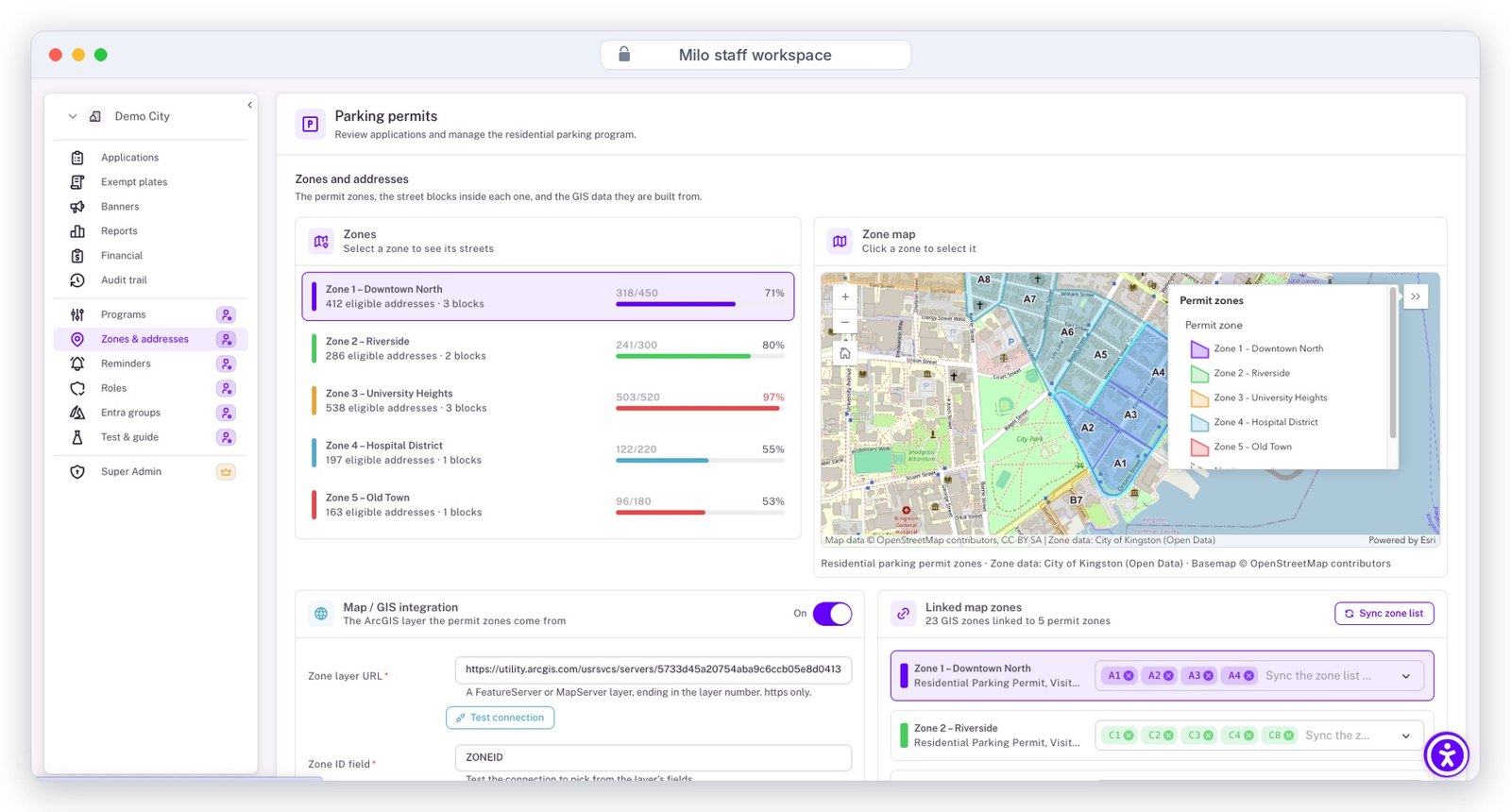
Zones and addresses — each permit zone with its eligible addresses and capacity, linked to the City's ArcGIS layer.
Programs and zones
Terms, limits per address, required documents, eligibility rules; zones imported from ArcGIS, shapefile or GeoJSON.
Users and roles
Assigned by a super admin — yours or Blü's; groups synced from Entra ID hourly; session limits and failed-login blocking.
Help where staff are
User guide and video tutorials inside Milo; role-based training sessions in English, French or Spanish; train-the-trainer.
Support and SLA
Weekdays 8–6 ET, 24/7 for emergencies; emergency response within 1 hour; quarterly service reviews; zero-downtime releases.
See these features on your own permits.
A configured walkthrough takes 45 minutes.